
Building a solution for the Salesforce AppExchange often requires your application to communicate with external services or perform operations that standard Apex cannot handle alone. In these scenarios, a Salesforce Connected App becomes the bridge for authentication and authorization. While you can maintain a Connected App definition in a standalone developer org, there are compelling technical and security reasons to include it directly within your managed package.
In this guide, we will explore the strategic advantages of packaging your Connected App, how it impacts the subscriber experience, and why it is a best practice for modern Salesforce development.
Understanding the Connected App Lifecycle
Before diving into the benefits of packaging, it is important to distinguish between a Connected App definition and its consumption.
Typically, as a vendor or developer, your Connected App definition lives in your packaging org or a dedicated developer edition. When a user in a different organization wants to use your app, they "allow" access via an OAuth flow. This creates a local reflection of that app in their org.
However, Salesforce allows you to add this definition directly to a managed package. When you do this, the Connected App behaves like any other component—such as a Custom Object or an Apex Class—and is deployed into the subscriber's environment upon installation.
1. Granular Security Control for Subscriber Admins
The most significant advantage of packaging a Connected App is the level of control it grants to the subscriber's System Administrator.
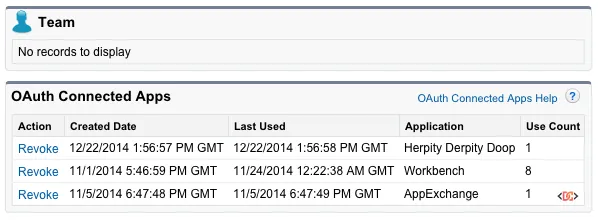
If a Connected App is not packaged, an administrator has a binary choice: they can either allow the app or block it entirely. This is managed via the "Connected Apps OAuth Usage" page in Setup. However, when the Connected App is part of an installed managed package, the administrator gains access to a much more granular suite of security settings.
Fine-Grained Permissions
By packaging the app, you enable the admin to: * Restrict Access by Profile or Permission Set: Instead of allowing every user in the org to authorize the app, the admin can limit usage to specific departments or roles. * Enforce IP Policies: Admins can decide if the app should respect existing IP relaxation rules or if it should require a multi-factor authentication (MFA) challenge. * Manage Session Policies: Admins can define how long an OAuth token remains valid before the user must re-authenticate.
Without packaging, these "Manage App" features are largely unavailable to the subscriber, leaving them with less oversight of how data is leaving their environment.
2. Standardizing Integration via Consumer Key and Secret
If you are developing an external API that needs to communicate with multiple Salesforce organizations, packaging the Connected App is a game-changer for your infrastructure.
When a Connected App is included in a managed package, the Consumer Key and Consumer Secret are preserved across every organization that installs the package. This means your external application only needs to store one set of credentials to initiate OAuth flows with any of your customers.
The ISV Advantage
Consider an ISV that provides a specialized reporting engine hosted on AWS. If the Connected App is packaged: 1. The AWS engine uses the same Client ID for every customer. 2. When a customer installs the package, the OAuth handshake recognizes the Client ID. 3. The customer grants access, and the AWS engine receives an access token unique to that org.
This consistency simplifies your backend configuration and ensures that your integration remains robust as your customer base scales.
3. Facilitating OAuth Flows for Metadata and Tooling APIs
There are certain operations within Salesforce that cannot be performed through standard Apex. For example, modifying metadata, managing deployments, or querying the Tooling API often requires a callout back into the Salesforce API itself.
By packaging a Connected App, you can facilitate a seamless OAuth flow that allows your package to securely access these advanced APIs. While the user still needs to grant access, having the definition pre-installed makes the setup process smoother and more professional. It eliminates the need for the user to manually create a Connected App in their own org—a task that is both error-prone and a significant friction point during onboarding.
4. Mobile App Policies and Enhanced Support
If your managed package includes a mobile component, packaging the Connected App is mandatory for a good user experience. Salesforce provides specific "Mobile Policy" settings for Connected Apps, such as: * PIN Enforcement: Requiring a passcode to open the app. * App Lockout: Setting a timeout period for inactivity. * Offline Access: Controlling how much data is cached locally.
These settings are only configurable by the subscriber admin if the Connected App definition exists within their org via your package.
Additionally, packaged Connected Apps benefit from Enhanced Subscriber Support. If a customer encounters an authentication issue, Salesforce support can better assist if the component is part of a formal managed package with a namespace, as it allows for better tracking and debugging within the subscriber's environment.
Frequently Asked Questions
Does packaging a Connected App expose my Consumer Secret?
No. While the Consumer Key (Client ID) is visible, the Consumer Secret remains protected. In a managed package, the secret is not exposed to the subscriber in plain text through the UI, ensuring your integration remains secure.
Can I update a Connected App after the package is released?
Yes. Connected Apps support push upgrades. If you need to change the callback URL or adjust the OAuth scopes, you can update the definition in your packaging org and push those changes to your subscribers.
What happens if I don't package the Connected App?
Your app will still work, but it will be listed as an "External App" in the subscriber's org. The admin will only be able to block or unblock it. You will also lose the ability to manage the app via profiles and permission sets, which may be a dealbreaker for enterprise-level customers with strict security requirements.
Key Takeaways
Including a Connected App in your managed package is a best practice for any serious Salesforce developer or ISV. It provides: * Admin Empowerment: Gives subscriber admins granular control over who can use the app via Profiles and Permission Sets. * Consistency: Maintains the same Consumer Key across all installations, simplifying external API integrations. * Security: Enables advanced policies like IP restrictions and mobile PIN requirements. * Professionalism: Creates a seamless installation and onboarding experience for your users.
By taking the extra step to package your Connected App, you are not just delivering code; you are delivering a secure, manageable, and enterprise-ready integration.