
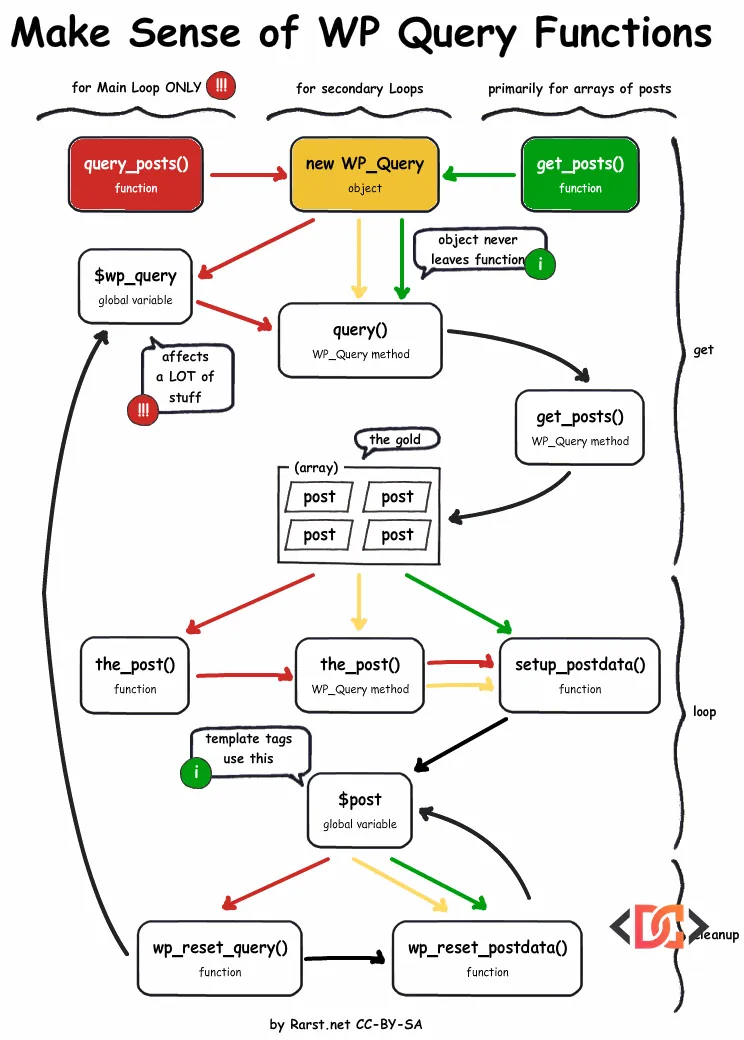
When you are developing a WordPress theme or plugin, one of the most common tasks you will face is fetching content from the database. Whether you are building a custom slider, a related posts section, or a specialized archive page, you need to query the database to retrieve the right posts. However, if you look through the WordPress Codex or various developer blogs, you will see three main contenders: WP_Query vs query_posts vs get_posts.
Choosing the wrong method can lead to slow page loads, broken pagination, and conflicts with other plugins. In this guide, we will break down exactly how these three functions differ, why one of them should almost never be used, and how to implement the modern standard: the pre_get_posts hook.
The Golden Rule: Avoid query_posts() at All Costs
If there is one takeaway from this article, let it be this: never use query_posts(). While it appears in many older tutorials, it is considered a problematic and inefficient way to modify the main query of a page.
query_posts() works by essentially nuking the main query object and replacing it with a new instance. This is inefficient because WordPress has already run the SQL query to determine which page you are on before your template even loads. When you call query_posts(), you are forcing WordPress to throw away those results and run a brand-new SQL query.
Furthermore, query_posts() breaks the global $wp_query object, which many plugins and core features (like pagination) rely on. To see the damage it does, you can run this test in any template:
// Check the state of the global query before
var_dump( $wp_query );

// Run a custom query using the old method
query_posts( '&posts_per_page=-1' );

// Check it again—the original data is gone!
var_dump( $wp_query );
If you absolutely must use it (which you shouldn't), you are required to call wp_reset_query() immediately after to restore the original global state. But why use a function that breaks things by design when better alternatives exist?
WP_Query: The Developer's Powerhouse
WP_Query is the class that powers almost everything behind the scenes in WordPress. When you use it, you are creating your own independent instance of the query engine. This makes it safe to use anywhere in your templates without interfering with the main page query.
When to use WP_Query
You should use WP_Query whenever you need to create a complex loop that requires pagination. Because WP_Query returns a full object, it contains valuable metadata about the results, such as the total number of pages and the current post count.
Here is a standard implementation of WP_Query:
$args = array(
    'post_type'      => 'post',
    'posts_per_page' => 5,
    'category_name'  => 'featured'
);

$custom_query = new WP_Query( $args );

if ( $custom_query->have_posts() ) :
    while ( $custom_query->have_posts() ) : $custom_query->the_post();
        // Your template tags like the_title() and the_content() work here
        the_title('<h2>', '</h2>');
    endwhile;

    // Restore original Post Data
    wp_reset_postdata();
endif;
By calling wp_reset_postdata(), you ensure that the global $post variable is returned to the state of the main query, preventing your custom loop from breaking subsequent template tags.
get_posts(): The Lightweight Alternative
get_posts() is essentially a wrapper for WP_Query, but it is designed for simpler tasks. Instead of returning a complex object, it returns a simple array of post objects.
Key Differences and Performance
get_posts() is generally faster than WP_Query for simple lists. This is because it passes 'no_found_rows' => true by default. This tells WordPress not to count the total number of matching posts in the database, which skips the calculation needed for pagination.
Use get_posts() for:
* Related posts at the bottom of a page.
* Recent posts in a sidebar.
* Pulling a specific list of IDs.
$args = array(
    'numberposts' => 10,
    'category'    => 1,
    'orderby'     => 'date',
    'order'       => 'DESC',
);

$recent_posts = get_posts( $args );

foreach ( $recent_posts as $post ) :
    setup_postdata( $post );
    ?>
    <a href="<?php the_permalink(); ?>"><?php the_title(); ?></a>
    <?php
endforeach;

wp_reset_postdata();
Note: get_posts uses slightly different parameter names than WP_Query. For example, it uses numberposts instead of posts_per_page and category instead of cat. However, internally, it converts these into standard WP_Query arguments before execution.
Modifying the Main Loop with pre_get_posts
What if you don't want to create a new query, but simply want to change the existing one? For example, you want your search results to only show 'products' instead of 'posts', or you want to change the post count on an archive page.
In these cases, you should use the pre_get_posts hook in your functions.php file. This allows you to modify the query before it is sent to the database, making it the most performant method possible.
function custom_modify_main_query( $query ) {
    // Only modify the query on the front-end and only for the main query
    if ( ! is_admin() && $query->is_main_query() ) {

        if ( is_home() ) {
            $query->set( 'posts_per_page', 1 );
        }

        if ( is_post_type_archive( 'portfolio' ) ) {
            $query->set( 'orderby', 'title' );
            $query->set( 'order', 'ASC' );
        }
    }
}
add_action( 'pre_get_posts', 'custom_modify_main_query' );
By using this hook, you avoid the overhead of running two queries (which happens with query_posts) and you keep your template files clean.
Frequently Asked Questions
Why does my pagination break when using custom queries?
Pagination usually breaks because the global $wp_query object hasn't been updated with the total page count of your custom results. If you use WP_Query, you must pass the paged parameter and ensure your pagination function is looking at your custom query object rather than the global one.
Can I use get_posts() with pagination?
Technically you can, but it is a "mess" to implement. get_posts() suppresses filters and skips row counting by default. If you need pagination, always use WP_Query.
Does get_posts() support sticky posts?
By default, get_posts() sets 'ignore_sticky_posts' => 1, meaning it ignores the "sticky" status of posts. If you need sticky posts to appear at the top, you should use WP_Query.
Wrapping Up
Understanding the nuances of WP_Query vs query_posts vs get_posts is a hallmark of a professional WordPress developer. To summarize:
- WP_Query is the standard for secondary loops, especially if you need pagination or complex parameters.
- get_posts() is a convenient, lightweight tool for retrieving an array of posts for sidebars or simple lists.
- pre_get_posts is the best way to alter the main loop on category, archive, or home pages.
- query_posts() should be avoided entirely to prevent performance bottlenecks and global variable conflicts.
By choosing the right tool for the job, you ensure your WordPress site remains fast, scalable, and easy to maintain.