

When building modern digital experiences with Sitecore Headless and Next.js, you often need more than just the raw value of a field. Whether you are building a generic component library or implementing conditional rendering logic, knowing the Sitecore field type directly from your GraphQL response is crucial. Traditionally, developers might have reached for a custom Content Resolver to inject this metadata, but in Sitecore 10.3 and other headless versions, you can achieve this directly through the GraphQL API.
In this guide, you will learn how to modify your GraphQL queries to include field type information, allowing your frontend application to make smarter decisions about how to render content. We will explore two primary methods: using the definition object and leveraging the built-in __typename meta-field.
Why Retrieve Field Types in GraphQL?
In a headless architecture, the frontend (often Next.js or React) is responsible for the presentation layer. While Sitecore provides standard JSS components like <Text />, <RichText />, and <Image />, there are scenarios where your code needs to be aware of the underlying template structure.
For example, if you are building a "Dynamic Field Renderer," your component might receive a list of fields and need to decide whether to render a simple string, a complex HTML block, or an image. By fetching the field type alongside the value, you eliminate the need for hardcoding field names into your frontend logic, making your application more resilient to changes in the Sitecore template.
Method 1: Using the Definition Object
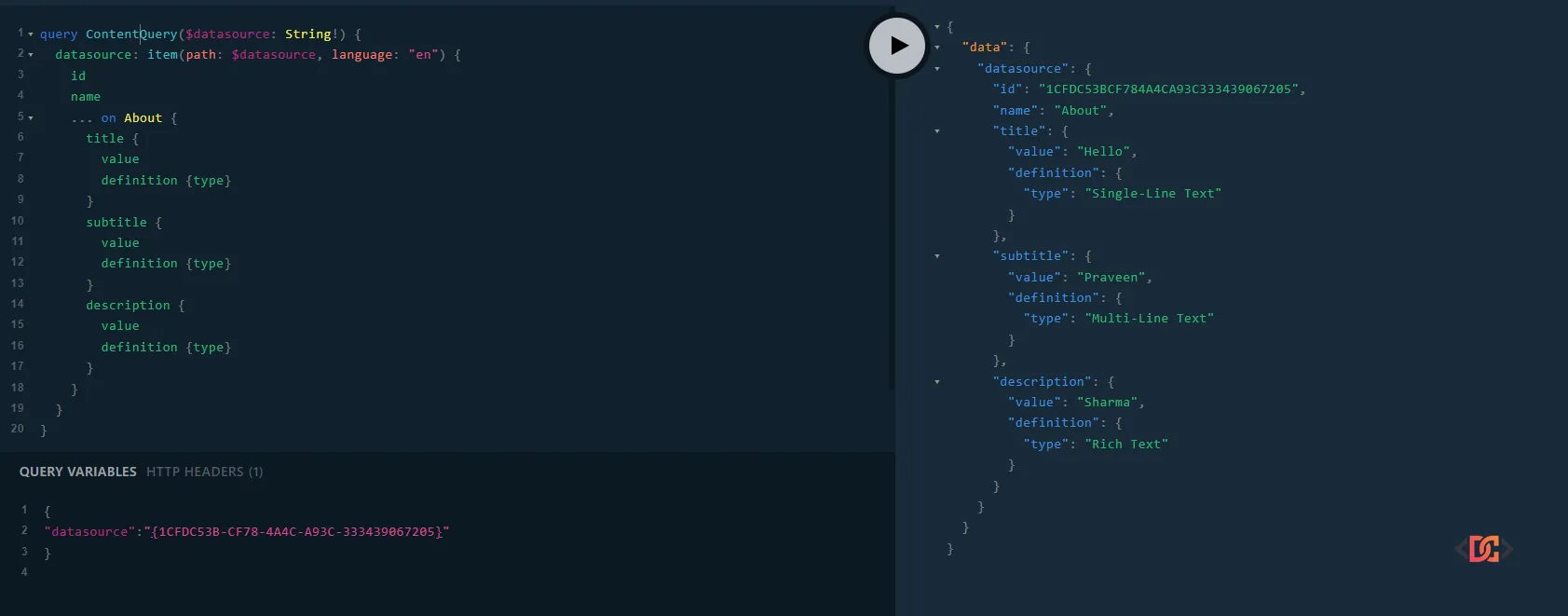
The most descriptive way to get the Sitecore field type is by using the definition field within your GraphQL query. This returns the actual Sitecore field type name as defined in the CMS (e.g., "Single-Line Text", "Rich Text", or "Checkbox").
The GraphQL Query
You can modify your existing item queries by adding definition { type } inside the field selection. Here is an example targeting a datasource item:
query GraphqlQuery($datasource: String!) {
  datasourceItem : item(path: $datasource, language: "en") {
    id
    name
    ... on ContentTemplate {
      title {
        value
        definition {
          type
        }
      }
      subtitle {
        value
        definition {
          type
        }
      }
      description {
        value
        definition {
          type
        }
      }
    }
  }
}
Why use this approach?
This method is ideal when you need the exact string representation of the Sitecore field type. This is particularly useful for logging, debugging, or when your frontend logic maps specifically to Sitecore's internal field naming conventions.
Method 2: Leveraging __typename for GraphQL Schema Types
If you prefer to work with the types defined in the GraphQL schema rather than the Sitecore-specific strings, you can use the __typename meta-field. Every object in a GraphQL schema has a __typename, and Sitecore's GraphQL implementation maps different field types to specific GraphQL types like TextField, RichTextField, or ImageField.
The GraphQL Query
query ContentQuery($datasource: String!) {
  datasource: item(path: $datasource, language: "en") {
    id
    name
    ... on About {
      title {
        value
        __typename
      }
      description {
        value
        __typename
      }
    }
  }
}
The Response Output
When you execute this query, the response will look like this:
{
  "data": {
    "datasource": {
      "id": "1CFDC53BCF784A4CA93C333439067205",
      "name": "About",
      "title": {
        "value": "Hello",
        "__typename": "TextField"
      },
      "description": {
        "value": "Sample Content",
        "__typename": "RichTextField"
      }
    }
  }
}
Why use this approach?
Using __typename is standard GraphQL practice. It is highly efficient and works perfectly with fragment-based architectures. If you are using tools like GraphQL Code Generator, __typename allows you to create TypeScript unions that make your frontend code type-safe.
Comparison: definition { type } vs __typename
| Feature | definition { type } | __typename |
|---|---|---|
| Output Example | "Single-Line Text" | "TextField" |
| Source | Sitecore Template Definition | GraphQL Schema Type |
| Use Case | CMS-specific logic | GraphQL type-safety and standard mapping |
| Performance | Slightly more overhead (fetches definition) | Extremely fast (built-in meta-field) |
Combining Both Methods for Maximum Flexibility
In complex enterprise applications, you might want the best of both worlds. You can combine these approaches to get the schema type for your code logic and the definition type for administrative or debugging purposes.
query FullFieldQuery($path: String!) {
  item(path: $path, language: "en") {
    id
    name
    ... on Page {
      title {
        value
        __typename
        definition {
          type
        }
      }
      content {
        value
        __typename
        definition {
          type
        }
      }
    }
  }
}
This provides a comprehensive response that tells you exactly what the field is from both a CMS and a technical perspective.
Frequently Asked Questions
Does this require a custom Content Resolver?
No. One of the biggest advantages of these methods is that they work out-of-the-box with the Sitecore Experience Edge or the local GraphQL endpoint. You do not need to write any C# code or deploy custom assemblies to retrieve this information.
Is this supported in Sitecore 10.3 Headless?
Yes, these features are standard in the Sitecore GraphQL implementation used in Sitecore 10.3 and later. If you are using Sitecore Experience Edge, these fields are also fully supported as part of the published schema.
Can I get the field type for standard fields like __Created?
Yes, as long as the field is exposed in the GraphQL schema, you can query its definition or __typename. However, standard fields often have specific types like DateField that are consistent across all items.
Wrapping Up
Retrieving the Sitecore field type via GraphQL is a powerful technique that enhances the flexibility of your headless frontend. By using definition { type } or __typename, you can build more dynamic, robust, and maintainable Next.js components that respond intelligently to your Sitecore data structures.
Key takeaways:
- Use definition { type } for the user-friendly Sitecore name.
- Use __typename for the technical GraphQL schema type.
- Avoid custom Content Resolvers for simple metadata needs to keep your headless implementation clean.
- Always check your GraphQL Playground to verify the available fields for your specific Sitecore version and configuration.