When developing in Apex, you often need to branch your logic based on the type of user currently interacting with the system. Whether you are enforcing security protocols, tailoring a UI, or managing community access, understanding the Salesforce UserType is essential. While the documentation provides a starting point, many developers find that the standard list doesn't cover every scenario they encounter in a production environment.
In this guide, you will learn the difference between various UserType values, how they relate to licenses, and how to handle special cases like the Automated Process user and Salesforce-to-Salesforce connections. By the end of this article, you will have a comprehensive reference for the UserInfo.getUserType() method and the User.UserType field.
What is the Salesforce UserType?
The UserType field on the User object represents the category of the user's license. It is a high-level classification that groups different User Licenses into functional buckets. For example, several different specific licenses might all fall under the "Standard" UserType.
In Apex, you typically access this information via the UserInfo class:
String currentUserType = UserInfo.getUserType();
System.debug('The current user type is: ' + currentUserType);
Knowing the UserType allows you to write more resilient code. For instance, if you are writing a trigger that should only fire for internal employees and not for Guest users or Partner users, checking the UserType is the most efficient way to achieve that goal.
Documented UserType Values
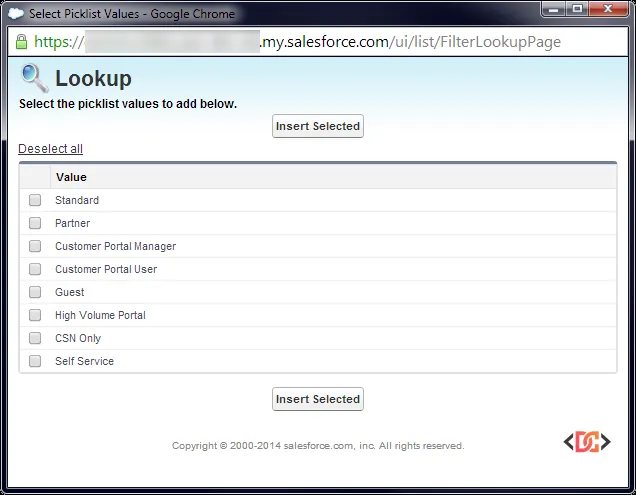
Salesforce officially documents several core UserType values. These are the most common types you will encounter in standard business applications and Experience Cloud (formerly Communities) implementations.
1. Standard
This is the most common type. It includes the standard Salesforce user license, as well as Salesforce Platform and Salesforce Platform One licenses. If a user is an internal employee with access to the core CRM, their UserType will almost certainly be Standard.
2. PowerPartner
This value represents a Partner user. These users typically access Salesforce through a Partner Portal or a Partner Community. They have more permissions than a standard customer but are still restricted compared to internal users. The UI label for this type is usually "Partner."
3. CSPLitePortal
This type is associated with "High Volume Portal" users. These are typically customers who access a portal but do not require a full role hierarchy or complex sharing rules. This is common in high-traffic customer support scenarios.
4. CustomerSuccess
This identifies a Customer Portal User. These users have limited access to the organization's data, typically restricted to their own records or records shared directly with them via a Customer Portal.
5. PowerCustomerSuccess
This represents a Customer Portal Manager. These users have more advanced capabilities than the standard CustomerSuccess user, such as the ability to view and edit data owned by users below them in the portal role hierarchy.
6. CsnOnly
This value is used for Chatter-specific licenses. This includes Chatter Free and Chatter Moderator users. These users can access the Chatter feed and people/groups but cannot access CRM objects like Accounts or Leads.
Undocumented and Special UserTypes
Beyond the standard documentation, there are several UserTypes that appear in specific technical contexts. Recognizing these is vital for debugging system-level behaviors.
Guest Users
The Guest UserType is used exclusively for unauthenticated users. If you have a public-facing Force.com Site or a public Experience Cloud site, any visitor who has not logged in will be identified as a Guest user. This is critical for security checks, as Guest users should generally have the most restrictive permissions.
AutomatedProcess
The AutomatedProcess UserType is returned when code is executed by the system itself rather than a human. You will see this frequently when working with Platform Events or certain background system tasks.
if (UserInfo.getUserType() == 'AutomatedProcess') {
    // Logic specifically for system-triggered events
    System.debug('This action was triggered by the Automated Process user.');
}
PartnerNetwork
If you are using Salesforce to Salesforce (S2S), the connection user has a unique identity. When the running user is the S2S Connection User, UserInfo.getUserType() returns PartnerNetwork.
It is important to note that the S2S Connection User is a "virtual" user in many ways. You cannot query this user in the User object, and attempting to inspect their Profile ID or User ID often results in insufficient privileges errors. If your code needs to support S2S, you must check for this UserType explicitly.
Self Service
The SelfService UserType is largely legacy. It was used for the old Self-Service Portal, which was deprecated in Spring ’12. While you are unlikely to see this in a new Salesforce organization, you may encounter it in older, "long-lived" orgs that have maintained their legacy portals.
How to Use UserType in Your Code
When writing Apex, you should use the UserInfo methods to determine the context. Here is a practical example of how to handle different user types to prevent errors in a trigger or controller:
public class UserContextUtility {
    public static void processContextLogic() {
        String uType = UserInfo.getUserType();

        switch on uType {
            when 'Standard' {
                // Logic for internal employees
                executeInternalLogic();
            }
            when 'PowerPartner', 'PowerCustomerSuccess' {
                // Logic for external managers
                executeCommunityManagerLogic();
            }
            when 'Guest' {
                // Restricted logic for public visitors
                executePublicLogic();
            }
            when 'AutomatedProcess' {
                // Avoid UI-related logic for system users
                return;
            }
            when else {
                System.debug('Encountered unexpected UserType: ' + uType);
            }
        }
    }
}
Frequently Asked Questions
Can I change a user's UserType?
You cannot change the UserType directly. The UserType is determined by the UserLicense assigned to the user's profile. To change the UserType, you must change the user's Profile to one that uses a different license type.
Why does UserInfo.getUserType() return 'Standard' for Platform Licenses?
Salesforce groups "Platform" and "Standard" licenses under the same UserType because they share the same fundamental architecture and internal-user behavior. Even though a Platform user cannot access standard CRM objects like Opportunities, they are still considered "Standard" internal users in the eyes of the UserInfo class.
How do I identify a user in a sandbox vs production using UserType?
UserType does not change between environments. It solely describes the license category. To distinguish between environments, you should use Organization.IsSandbox or check the System.URL methods.
Wrapping Up
Understanding the nuances of the UserType field is a hallmark of an experienced Salesforce developer. While most of your users will fall into the Standard or PowerPartner categories, being aware of Guest, AutomatedProcess, and PartnerNetwork ensures that your Apex code remains robust even in complex, multi-system environments.
Always remember to verify your logic against the specific version of the Salesforce API you are using, as new license types and user categories are occasionally introduced during seasonal releases.