Encountering the error "Required parameter 'theme_dir' was not passed" can be a frustrating experience for Magento 2 developers and store administrators alike. This error typically surfaces when the Magento system expects to find a specific theme on the filesystem, but the files are missing or the database references are mismatched.
In this guide, we will explore why this happens and provide several methods to resolve the issue, ranging from simple admin configurations to advanced database and code-level fixes.
Why Does This Error Occur?
The core of the problem is a synchronization issue. Magento stores theme information in the theme database table and associates it with your store views in the core_config_data table. If you manually delete a theme folder from app/design/frontend/ without first changing the theme in the Admin Panel, Magento will continue looking for those files. When it fails to find the directory, it throws the theme_dir error.
This can also happen during CLI operations, cron jobs, or when switching Git branches where a specific theme has not yet been merged.
Method 1: The Admin Panel Fix (Recommended)
If you still have access to the Magento Admin, this is the safest way to resolve the issue.
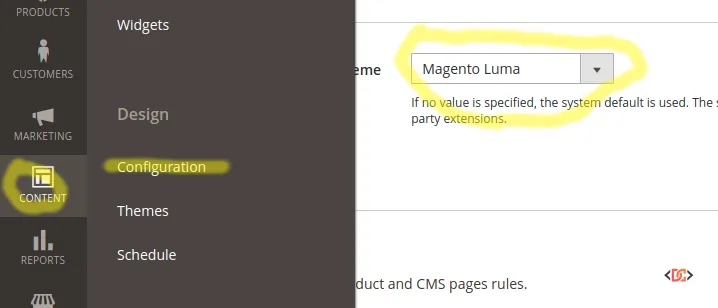
- Navigate to Content > Design > Configuration.
- Select the Edit button for the specific scope (Global, Website, or Store View) currently throwing the error.
- Under the Default Theme tab, change the Applied Theme to a valid one (such as Magento Blank or Magento Luma).
- Save the configuration.
- Navigate to Content > Design > Themes and delete the record of the non-existent theme if it still appears there.
Method 2: Manual Database and Filesystem Cleanup
If the error is preventing you from accessing the Admin Panel, you will need to perform a manual cleanup of the database and the temporary file directories.
Step 1: Clear Static Files
Run the following command to remove preprocessed views and static content that may be caching the old theme path:
rm -rf var/view_preprocessed/* pub/static/frontend/* var/cache/* var/page_cache/*
Step 2: Database Operations
You need to remove the reference to the deleted theme from the theme table and reset the configuration.
- Open your database management tool (like phpMyAdmin or the MySQL CLI).
- Locate the
themetable and delete the row corresponding to your missing theme. - Run the following SQL query to reset the theme ID in your configuration:
UPDATE core_config_data SET value=NULL WHERE path='design/theme/theme_id';
Alternatively, if you know the ID of a valid theme (e.g., '1'), you can set the value to that ID instead of NULL.
Step 3: Flush Cache
After modifying the database, flush your cache via the CLI:
php bin/magento cache:flush
Method 3: Fixing the Error in CLI and Cron Jobs
Sometimes this error occurs specifically when running CLI commands or sending emails via Cron. This usually happens because the "Area Code" is not properly emulated, leading Magento to look for the theme in the wrong directory (like global/Magento/backend).
Using Area Emulation
If you are writing custom code that triggers this error, ensure you are emulating the frontend area correctly:
/** @var \Magento\Framework\App\State $state */
$this->appState->emulateAreaCode(
    \Magento\Framework\App\Area::AREA_FRONTEND,
    function() {
        // Your logic for sending emails or processing orders here
    }
);
This ensures that the theme loader looks in the correct frontend directory rather than failing in the global or adminhtml scope.
Method 4: Proper Theme Uninstallation
To avoid this error in the future, always use the Magento CLI to uninstall themes. This command handles both the filesystem removal and the database cleanup automatically:
bin/magento theme:uninstall --clear-static-content frontend/Vendor/themename
Troubleshooting Permissions
In some scenarios, the theme files exist, but Magento cannot read them due to restrictive file permissions. If you have verified the files are present and the database entries are correct, try resetting your permissions:
find . -type f -exec chmod 644 {} \;
find . -type d -exec chmod 755 {} \;
find ./var ./pub/static ./pub/media ./generated -type d -exec chmod 777 {} \;
chmod u+x bin/magento
Wrapping Up
The "Required parameter 'theme_dir' was not passed" error is almost always a result of a broken link between your database configuration and your physical file structure. By ensuring your theme table is clean and your core_config_data points to a valid theme ID, you can quickly restore your store's functionality.
Remember to always use developer mode during theme development to get more descriptive error messages, and use the theme:uninstall command for a cleaner workflow.